1.1 Introduction: Data, Information, Database, and DBMS

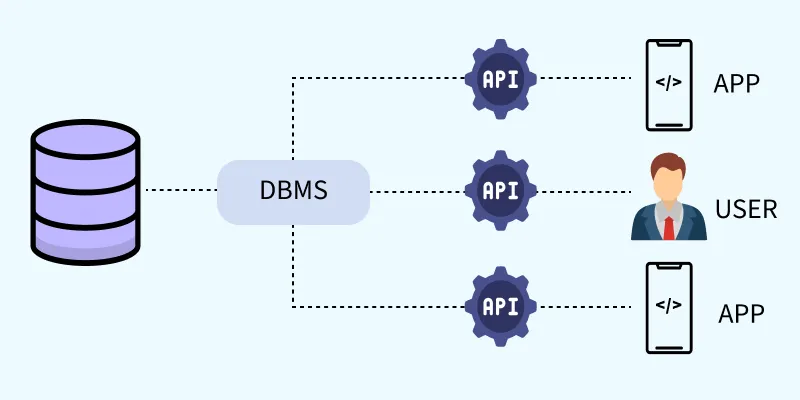
Data: Data is the raw fact which is composed of alphabets, digits, special, symbols, etc. For example, Ram, 26, Mahendranagar, etc.
Information: The processed data that gives meaningful result is called information. It is an organised collection of related data which gives a complete sense. For example, Ram is 26 years old who lives in Mahendranagar.
Database: It is a collection of interrelated data of objects or entities in a structured form / tabular form. For example, customer record, books library, etc.
DBMS: It is a software that defines, manipulates and manages the database. It allows to access the fields, update the records and retrieve the data as requested. Some examples are MS-Access, Oracle, My SQL, etc.
[Description of diagram: A logical view of a database system shows User 1, User 2, and User 3 sending a 'Request' to the DBMS. The DBMS then interacts with the Database (DB) to fulfill the request.]
Some basic terms in DBMS
- Field: A field is the property or attributes of a table. For example, name, phone number, etc.
- Record: Record is a collection of interrelated fields. For example, 1, Ram, etc.
- Table: Table is the arrangement of rows and columns. In table, a row defines a record and column defines field and vice versa.
- Objects: They are used in database to store the data. It holds the data for manipulation and display it in the proper format.
Keys in DBMS
- Candidate key: All attributes combinations inside a relation that can be used to uniquely identify required record are candidate keys. A relation can have multiple candidate keys. Sometimes there is more than one attribute processing the unique identification property. In this case all attribute combination provide a unique record which is called candidate key.
- Primary key: Primary key is a unique key/value in database which is used to show the relationship between different tables or objects and also helps in reducing data duplicacy. For example, registration number, Citizenship number, etc. Primary key is a candidate key chosen by a database designer to identify the entity from the entity set. It uniquely identifies the all records of table. Although several candidate keys may exist, one of the candidate key which is selected be the primary key.
- Alternate key: Alternate key is not a primary key but combining one or more columns can make it unique. It can also be used instead of primary key. In the case of two or more candidate keys, only one of them serves as primary key. An alternate key is the candidate key which is not used as the primary key.
For example: In Student(Student_id, Name, Roll_no, class_id), the Student is the Entity and student-id, Name, Roll-no and class-id are the attributes. If we see the attributes student_id, Roll-no and class-id, all of them can uniquely identify the record that's why all of them are candidate key. Only one of them can be the primary key in the table so we choose student-id as a primary key and the remaining attributes Roll-no and class-id are the alternate key.
1.2 Advantages and Disadvantages of Using DBMS
Advantages of DBMS
Some of the advantages of DBMS are mentioned below:
- Reduce data redundancy/duplicacy.
- Fast and easy file sharing.
- Data integration.
- Backup and recovery.
- High data security (Authenticated data).
- Multiple user interface.
Disadvantages of DBMS
Some disadvantages of DBMS are mentioned below:
- Setup cost is expensive.
- Changing technology.
- Needs Technical training.
- Hacking and data leakage.
1.3 Data Definition Language (DDL) and Data Manipulation Language (DML)
DDL (Data Definition Language): Data definition language (DDL) consists of the SQL commands that is used to specify the content and structure of the table. It defines the physical characteristics of record. It uses commands such as CREATE, DROP, RENAME, ALTER etc.
- a. CREATE: It is used to create a database or table.
For example:CREATE TABLE employee (id int, name varchar(30), address varchar(30), PRIMARY KEY (id)); - b. DROP: It is used to delete the table of database.
For example:DROP TABLE employee; - c. ALTER: It is used to change or add any field in the table.
For example:ALTER TABLE employee ADD phone VARCHAR(10);
DML (Data Manipulation Language): DML is the manipulation of records such as retrieval, sorting, display, deletion, etc. It helps users to use query and display record/report accordingly. It provides techniques to manipulate the database. It is used to select, insert, delete or update any records of the table. It uses commands such as INSERT, DELETE, SELECT, UPDATE, etc.
- a. SELECT: It is used to select any records from the table.
For example:SELECT * FROM employee WHERE salary > 35000; - b. INSERT: It is used to insert new records in a table.
For example:INSERT INTO employee (id, name, address, salary) VALUES (7, 'Anil Thapa', 'Kathmandu', 25000); - c. UPDATE: It is used to modify the value of some field in the table.
For example:UPDATE employee SET address = 'Biratchowk' WHERE id=7; - d. DELETE: It is used to delete records from the table.
For example:DELETE FROM employee WHERE id=7;
Differences between DDL and DML
| DDL | DML |
|---|---|
| It is a type of SQL command that helps to define database schemes. | It is a type of SQL command that helps to retrieve and manage data in relational databases. |
| It stands for Data Definition Language. | It stands for Data Manipulation Language. |
| CREATE, DROP, ALTER are some DDL commands. | INSERT, UPDATE, DELETE are some DML commands. |
| Commands affect the entire database or the table. | Commands affect one or more records in a table. |
| SQL statements cannot be rolled back. | SQL statements can be rolled back. |
1.4 Database Model
There are different forms of database management system, they are:
1. Hierarchical Model
It is one of the oldest type of database model in which all records are arranged in a tree like structure. All the records in the hierarchy are called nodes. In this model, the records are in a parent-child relationship basis in which children have only one parent but parents can have many children. Each parent record may have one or more child records. The top level record in the hierarchy is called the root record. And also the top level record gets higher priority than the child at bottom level.
[Description of diagram: A tree structure shows CEO at the top (root). CEO has two children: Manager 1 and Manager 2. Manager 1 has Staff 1 and Staff 2. Manager 2 has Staff 3. Staff 2 has Worker 1 and Worker 2.]
Advantages of hierarchical model
- Easiest model to implement.
- It supports one-to-one and one-to-many relationship.
- Highly secure model.
- Searching is fast and easy if the parent is known.
- It is easy to add or delete information.
Disadvantages of hierarchical model
- It is old fashioned and outdated.
- It does not support many-to-one relationship.
- It increases data duplicacy.
- Dependency on parent node.
- If parent node is disturbed, then the whole hierarchical model may be disturbed.
- When a parent node is deleted, all the children nodes are deleted automatically.
2. Network Model
It replaces hierarchical model due to some limitations. Network database model is a modified version of the hierarchical database model. The structure of database is more like graph rather than tree like structure. In this model, children can have multiple parents. It allows a many-to-many relationship in the tree like structure. We can extract data from any nodes instead of starting from the root record. The data access in this database model is either in sequential form or can be in a circular linked list pattern.
[Description of diagram: A graph structure shows 'Transport' at the top. 'Transport' connects to 'Fuel' and 'Electric'. 'Fuel' connects to 'Bus' and 'Car'. 'Electric' connects to 'Car' and 'Bike'. This shows that 'Car' has two parents ('Fuel' and 'Electric').]
Advantages of network model
- It supports many-to-one relationship.
- Searching is faster because of multidirectional pointers.
- Simple and easy to design.
- It reduces data duplicacy.
- Good for dynamic database.
- It is more flexible than hierarchical database model.
Disadvantages of network model
- It is less secure.
- Difficult for complex relationship.
- It is one of the complex database models.
- Data redundancy is higher in this model.
3. Relational Database Model
The database model which stores and displays data in tabular form (i.e. rows and columns) is known as relational database model. In a relational database, the data are organized in the form of tables with rows and columns. Each table column represent field name and each row represents a record. A record is also known as a tuple. The data in one table is related to a data in another table with a common field. For example, MySQL, Oracle, Ms-Access, etc.
Advantages of relational database model
- Database processing is faster.
- Low chances of data duplicacy.
- Data integrity can be easily implemented.
- Normalization can be done with it.
- It is very easier for sorting and searching the record.
Disadvantages of relational database model
- More complex than other models.
- Difficult to understand.
- Sometimes too many tables may be created because of complex relationship.
- It is not user friendly because it contains too many rules.
4. ER (Entity-Relationship) model
It shows the relationship between various real life entities and their attributes.
Components of ER diagram
- Entity: Entity represents real life objects. For example, student, library, hospital, etc. It is represented by rectangular shape. Its symbol is a rectangle.
- Attributes: Attributes possess the characteristics of entity. It may be single valued, multi-valued or derived. It is represented by oval shape. A simple oval for a single-valued attribute, a double oval for a multi-valued attribute, and a dashed oval for a derived attribute.
- Relation: Relation shows the logical coordination between two or more than two entities. It is represented by diamond shape.
- Lines: Lines are also called connectors that connect entities, attributes and relations. It is represented by single line.
[Description of diagram: An ER diagram shows a 'Student' entity (rectangle) connected to a 'Library' entity (rectangle) via an 'Issue/Return' relationship (diamond). 'Student' has attributes: stu-id (oval, underlined for primary key), stu-name (oval), and stu-photo (oval). 'Library' has attributes: book-id (oval, underlined), book-name (oval), book-pub (oval), and book-price (oval).]
Advantages of ER model
- Easy to represent and understand the flow of data as it is in pictorial form.
- Helps in creating a link between several entities.
- Easy to implement ER-diagram into DBMS.
Disadvantages of ER-model
- It may become complex with more no. of relations.
- Users need to remember symbols.
1.5 Concept of Normalization
Normalization is a process in which complex database table is broken down into separate tables. This makes data model more flexible and easier to maintain. Hence it reduces complexity of database. Normalization is the process of breaking a big table into much smaller and simplest tables.
Types of normalization
1. First Normal Form (1NF)
First normal form (1NF) sets the very basic rule for an organized database. A relation or table is said to be in 1NF if all its attributes are atomic. That is, there should not be any repeating groups of an attribute.
- The datafield must be atomic (Single record).
- It eliminates duplicate rows and columns of the same table.
- It minimizes the data redundancy in the database table.
Example (Un-normalized):
| SN | Name | Phone No |
|---|---|---|
| 1 | Ram Bhatt | 9848 9742 |
| 2 | Sita Pant | 9785 |
Example (1NF):
| SN | first_name | last_name | Phone No |
|---|---|---|---|
| 1 | Ram | Bhatt | 9848 |
| 1 | Ram | Bhatt | 9742 |
| 2 | Sita | Pant | 9785 |
2. Second Normal Form (2NF)
Second normal form (2NF) further addresses the concept of removing duplicate data. To be in 2NF, the table must be in 1NF. A relation is said to be 2NF if it is in 1NF and each attribute is functionally dependent on the entire primary key. Here, non-key attributes are functionally dependent on key attributes (or primary attributes). The purpose of 2NF is to eliminate partial key dependencies.
Example (Continuing from 1NF): The table is not in 2NF because `Phone No` is dependent on `SN`. To make it 2NF, we split it into two tables.
Table 1: Name
| SN (Primary Key) | first_name | last_name |
|---|---|---|
| 1 | Ram | Bhatt |
| 2 | Sita | Pant |
Table 2: Phone
| SN (Foreign Key) | Phone No |
|---|---|
| 1 | 9848 |
| 1 | 9742 |
| 2 | 9785 |
3. Third Normal Form (3NF)
To be in third normal form (3NF), the data must be in 2NF and it must remove transitive dependency. A relation is said to be in third normal form if it is in second normal form and if it does not contain any transitive dependency on the primary key. Here, transitive dependency means, if A→B and B→C, then A→C.
For example:
| SN | Name | City | District | Country |
|---|---|---|---|---|
| 1 | Ram | MNR | Kanchanpur | Nepal |
| 2 | Shyam | Banbasa | Uttarakhand | India |
| 3 | Hari | Kapan | Kathmandu | Nepal |
Here, SN -> City -> District -> Country. This is a transitive dependency. To convert to 3NF, we break the table:
Table 1: Person
| SN | Name | City |
|---|---|---|
| 1 | Ram | MNR |
| 2 | Shyam | Banbasa |
| 3 | Hari | Kapan |
Table 2: Location
| City | District | Country |
|---|---|---|
| MNR | Kanchanpur | Nepal |
| Banbasa | Uttarakhand | India |
| Kapan | Kathmandu | Nepal |
1.6 Centralized vs Distributed Database
Centralized database
It is a simple type of database which works on client server basis. In this type, the database is centralized and run on a single computer system. A centralized database is a database located in a single location on single computer.
Advantages of centralized database
- It is easy to implement.
- Cost friendly.
- Suitable for smaller organization.
- High security / More Secure.
- Maintenance of database is easier.
- Since all data is stored at a single location, it is easier to access and manipulate data.
- It provides easier database administration.
- There is a high level of data integrity in the centralized database.
Disadvantages of centralized database
- It is dependent on central server. If the server goes down, the whole system will be disturbed.
- Not suitable for large organization.
- Not suitable for huge data traffic.
- There is high data traffic in a centralized database if there are more end-user.
- If any kind of system failure occurs at the centralized system, then the entire database will be destroyed.
Distributed database
It is a complex type of database system which is a collection of multiple logically interrelated databases, which may be in different geographical locations. In a decentralized database model or distributed database model, the database is stored on several computers. In other words, it is a collection of different centralized databases in different locations.
Advantages of distributed database
- It can handle huge data traffic at the same time.
- Backup and recovery is easier.
- It is suitable for large organization.
- Failure of a site doesn't affect the whole computer system.
- It is much reliable as compared to the centralized database system.
- The performance and service are better than centralized database system.
- Due to the use of multiple servers, it can support a large number of users and computers at the same time.
Disadvantages of distributed database
- It is highly expensive.
- It is highly complex.
- Security issues / Less Secure.
- Sometimes there may be collision of data.
- Maintenance is difficult.
- In this database, it is difficult to provide a uniform view to user since it is spread across different physical locations.
- There may be the problem of data integrity.
Differences between centralized and distributed database
| Centralized database | Distributed database |
|---|---|
| It depends upon central server. / It is located in a single location. | It has several servers. / It is located in multiple location. |
| It can't handle huge traffic at the same time. | It can handle huge traffic at the same time. |
| Maintenance is easier. | Maintenance is difficult. |
| More secure. | Less Secure. |
| Not suitable for large organization. | Suitable for large organization. |
| It is cheap to establish. | It is expensive to establish. |
| If a server fails, entire system will not work. | If one server fails, all the systems are backed up by another server. |
1.7 Database Security and Integrity
Data security refers to the safety of hardware and software data required for DBMS. Database security means not only protecting and securing a database but also providing data to authorized person. The database security ensures the confidentiality, integrity, and availability of the data.
Hardware Safety / Physical Security
Physical database security is the protection of the database server room from unauthorized access. A database server should be located in a secure and climate-controlled environment in a building.
- Regular maintenance of the hardware components.
- Temperature control.
- Free from dust.
- Electric stabilization.
Software Security Measures
- Use genuine software: Use original and licensed software.
- Use strong anti-virus and update it regularly: The antivirus software protects computer systems from computer viruses. It protects database, applications, etc. from being damaged or lost.
- Use of strong firewall: Firewalls help prevent unauthorized access to your database.
- Use of proper authentication techniques: Use security features like pattern, PIN, biometric, OTP, etc.
Authentication: Database authentication is the process of confirming whether a person has the right to access a database or not. It verifies the user's login credentials with the database and allows a user to access the database only when the login credentials match with the database. - Database Encryption: It is a security measure where a sender encrypts the information into ciphertext (i.e. unreadable format) and the receiver decrypts the ciphertext and gets the origin content. It helps a user to protect sensitive data from cyber-attacks.
- Use VPN if necessary: A VPN encrypts your internet connection to protect data.
- Backup Database: A backup database allows a user to restore data in the case of data loss, data corruption, hacking or natural disasters. Making a copy of the database is a data backup.
Data Integrity
Data integrity is a rule that restricts the values that may be present in the database. Data integrity ensures that changes made to the database by authorized users do not result in a loss of data consistency.
Types of Data Integrity
- a. Entity integrity: Entity integrity is the rule that no column that is part of the primary key may accept null values. Entity integrity prevents the primary key from accepting null values and ensures that one record can be distinguished from another.
- b. Referential integrity: The referential integrity rule states that if table A contains a foreign key that matches the primary key of table B, then values of this foreign key either must match the value of the primary key for some row in table B or must be null.
- c. Domain integrity: Domain constraints specify the set of possible values that may be associated with an attribute. Such constraint may also allow the use of null values for particular attributes.