Unit 5- Programming Concepts and Logics
5.1 Programming Concept
PROGRAMMING CONCEPTS
Program:
Program is a group of instructions given to the computer to perform a certain task. A program is used to solve a problem in computers. The program is written using a series of instruction that consists of all symbols, characters and certain rules.
A computer specialist who is responsible for designing, writing and modifying computer program is known as computer programmer. Programmer had depth knowledge about programming tools, techniques and programming language.
Feature of good program
- Integrity: A program should be complete and must give the desire output.
- Clarity: A program should be clear and should not be ambiguously.
- Simplicity: A method for solving a problem should be very simple and easily understandable.
- Efficiency: A program should take less memory and processing time, as a result it runs faster. Such kind of program automatically increases the efficiency of computer.
- Maintainability: A program should be easy to maintain and update in future.
- Reliability: It should be reliable so that user can depend on it.
- Generality: It should be flexible and easy to operate with a wide range of platform.
- Modularity: A program should be divided into different modules in order to complete a complex problem.
- Robustness: A program should be almost 100 % perfect.
- Documented: Documentation helps for smooth operation for the users and even helps for further modification and maintenance.
Computer Program:
Computer program is a group of instructions given to the computer to perform a certain task. A program is used to solve a problem in computers. The program is written using a series of instruction that consists of all symbols, characters and certain rules.
Programming Language:
The process of writing computer using such rules and symbols is called computer programming or coding. Computer programming is used to prepare computer programs and software.
The language which is used to develop program in computer is called programming language. Being an electronic machine, computer can understand only binary code i.e. 0 and 1 represented by the flow of electricity in the form of 'ON' and 'OFF' in voltage.
Every programming language consists of a set of codes that a computer programmer uses to give instruction to computer to perform some specific task. The set of rules to write the code is called syntax. The computer understand the code after it is complied.
Nowadays there are many programming language for making program in computer. For example: C, C++, VB, .NET, Java etc.
Differences between Program and Software
| Program | Software |
|---|---|
| It is a set of instructions which instructs computer to perform a specific job. | It is a collection of instructions, programs, and data which instruct the computer on how to solve computer problems. |
| It is independent. | To develop software, collections of programs are needed. |
| It is a component of software | It is a logical unit driving the computer system. |
| It defines the computer process. | It defines both data and process. |
| A programmer creates programs. | Software is created by groups of programmers as a team. |
| It is not generally licensed for sale. | It is generally licensed under a company. |
| It cannot be divided in accordance to needs and uses. | It can be divided under various needs and uses like application software, utility software, system software, etc. |
| Example: SYS, FORMAT.SYS, interest calculations, etc. | Example: MS Word, Adobe Photoshop, Internet Explorer, etc. |
Types of computer programming Language
- Low Level Language
- Machine Level Language (First Generation Language)
- Assembly Level Language
- High Level Language
- Procedural language
- Problem oriented language
- Natural Language
Low Level Language:
Low level language is a machine oriented or depended language in which detail knowledge of hardware specification is required to run the program. Statements in Low Level language are written based on the hardware structure of the computer. The low level language is divided into two types:
Machine Level Language:
The machine language which is written in the form of binary 0's and 1's. The machine level language is directly understand by computer because it is written in the form of 0's and 1's. Each instruction of the machine level language tells computer what to perform. The programs written in machine level language are executed very fast than the program written in any other language.
Advantage
- Program execution is faster than other language.
- It does not require any translating program.
Disadvantages
- Machine Level Language are machine dependent
- It is difficult to perform the machine level language.
- Program development is time consuming.
- There is a greater chance of error in the programming.
Assembly Level Language:
Assembly Level Language is a low level machine dependent language in which the symbolic codes (Mnemonic codes) are used to write assembly programs. With the use of symbolic codes in assembly language, it is easy to write the program for the programmer. For example ADD for addition, SUB for Subtraction, CMP for Comparison. It is easier to understand, find error and correct error. The program written in assembly language needs to be translated into the machine level language. This is done by an assembler an assembler translates the assembly level language into the machine language.
Advantage
- It is easy to understand
- It is easy to find and correct error.
- It is easier to modify.
- Program Execution is faster than High level language
Disadvantage
- It is machine dependent language.
- Program development and debugging is more difficult and time consuming than HLL.
- It is very hard to remember the mnemonics
- It required translating program.
High Level Language:
High Level languages are the language which uses human language and mathematical notations. High level language uses the English keywords and mathematical symbols to write the program rather than mnemonics codes used in assembly language. High level languages are machine independent. While using high level language the program is not concerned about the machine structure of the computer. The high level language is to be translated into machine level language. This task is done by using the compilers and interpreters. These are also called translating program. The program written using high level language is easier to maintain than low level language. Advanced program can be developed using high level programming language. Some of the common high level language is: BASIC, PASCAL, FORTRAN, C++, Java etc.
Advantage
- It is machine independent
- It is easier to learn and develop
- Easily detect and remove errors.
- It is easier to maintain.
- Lower programming cost.
- Better documentation.
- Programmer does not need to remember large no. of mnemonics.
Disadvantage
- Computer does not understand directly
- More time to require for execution of the program.
- Require more memory space
- Less flexibility
- It needs to be translating program.
- Operating speed is slow.
High Level Language can be further categories as:
- Procedural oriented language (3GL)
- Problem oriented language (4GL)
- Natural Language (5GL)
Differentiate between Assembly level language and Machine level language.
| S.N. | Assembly Level Language | S.N. | Machine Level Language |
|---|---|---|---|
| 1 | It can't directly understand by computer. | 1 | It can directly understand by computer. |
| 2 | It need to translator program: Assembler | 2 | It is not required translator program. |
| 3 | It is used to symbolic instructions code. | 3 | It is used to 0 and 1 code in program. |
| 4 | It is also called symbolic/2nd generation language | 4 | It is also called binary/1st generation language. |
| 5 | It takes more time to execution. | 5 | It takes less time to execution. |
| 6 | It is easy to understand & write program. | 6 | It is difficult to understand & write program. |
| 7 | It is easy to debug errors. | 7 | It is hard to debug errors. |
Fourth Generation Language:
Fourth generation language was developed after HLL, so it is one step ahead from HLL. It is result/problem oriented programming language and it contains database query language. Fourth generation language program is also needed to be translated either by compiler or interpreter into machine understandable code before they are executed as it is not directly understood by the computer. Example of 4GL is SQL (Structure Query Language), Visual Basic, C#, PHP.
Language Processor (Translator)
Language Processor is the programs that translate the program written in other language (source program) to the machine level language program (object program). They are three types.
1. Assembler:
An assembler is a translator or translating program which translates codes of assembly language into equivalent machine level code. The program which is to be translated by assembler is called source program and the translated program by assembler is object program.
2. Compiler:
A compiler is a translating program that translates the program written in high level language into equivalent machine level language at once. The program written in high level language is called source program and the program translated into machine language is called object program.
3. Interpreter:
An interpreter is a translating program which translates the program written using high level language into equivalent machine level language one line at a time. It is similar to compiler but it converts the program's one line at a time into machine level language.
Differentiate between Compiler and Interpreter.
| S.N. | Compiler | S.N. | Interpreter |
|---|---|---|---|
| 1 | It translates a complete high level language into machine language at once. | 1 | It translates high level language program into machine languages instruction line by line. |
| 2 | It is slow for debugging. | 2 | It is faster in debugging. |
| 3 | It creates an object program. | 3 | It does not create an object program. |
| 4 | It is not easier to find out and correct mistake in source program. | 4 | It is easier to find and correct mistake in source program. |
| 5 | It compiling process is faster. | 5 | It compiling process is slower. |
| 6 | Examples: C, C++, Visual Basic etc. | 6 | Examples: BASIC, LISP etc. |
List of high level programming language
- FORTRAN: Formula Translator is the first High Level Language which is very powerful language for scientific and engineering computations.
- LISP: List Processing language is functional language for list processing, recursive, and not iterative. It is suitable for solving non numeric operations and used in the field of AI (Artificial Intelligence) and pattern recognition.
- CPL: Combined Programming Language is used polymorphic testing structures and it has list and array. It was a step toward the design of the c language.
- COBOL: Common Business Oriented Language is a classical procedural language aimed at enterprise management.
- BASIC: Beginner's All-purpose Symbolic Instruction Code.
- BCPL: Basic Combined Programming Language is also uses procedures and functions.
- PASCAL: PASCAL is a structured programming language.
- PROLOG: Programming Logic language is used for solving natural logic and in the field of knowledge based system which is a branch of AI.
- C: C is a procedural programming language.
- C++: It is also called Object Oriented version of C, powerful and efficient language for developing software.
- JAVA: Java is also Object Oriented Programming Language for internet web and mobile applications.
- .NET: It is read as 'dot NET' is powerful features of different programming language into one environment. It is most commonly used for solving web based applications and distributed mobile applications.
- XML: eXtensible Markup Language is more advanced markup language than HTML for web content development. It helps to manages sources document in several different formats such as web page, printable documents, PDF files etc.
- JavaScript: JavaScript is a scripting language. It can run inside simple web browser application and calculation. It shares the syntax of C or Java.
- ASP: Active Server Page is server site web scripting language developed by Microsoft Corporation for accessing database from web application.
- PERL: Practical Extraction and Reporting Language is one of the first scripting languages on UNIX system. It is open source and found on UNIX/Linux based server.
- PHP: Hypertext Preprocessor is very popular server site scripting language on UNIX/Linux system. It is very popular for accessing database like My SQL and Oracle. It is open source software.
Testing and Debugging
Bug / Error:
Errors are the mistake in the program. The Error can be in syntax or logic of the program.
Testing:
Testing is the process of making sure that the program performs the intended task.
There are several stages of testing. They are:
- Unit testing involves the individual components' testing.
- Integration testing involves the separate components' testing as they are put together.
- System testing that involves the whole final form of a program testing.
- User acceptance testing involves the user testing the program to see that it is the result what is required.
Debugging:
Debugging is the processing of discovery and correction of programming errors (bugs).
- Many syntax and logical errors might have occurred while writing a program.
- Debugging a program can take from a few seconds to months and even years depending on the bug, size of a program and type of system programmer etc.
Syntax and Semantics (Logical) errors
Syntax / Logical:
Syntax is the arrangement of words into a sentence. It describes the rules by which words can be combined to make a meaningful sentence. For eg. S.+V.+O. The syntax defines whether the instruction is correct or not. If the syntax of the program is not correct, then the compiler or interpreter detects an error called syntax error and informs the programmer. Then the program execution gets terminated.
Semantic:
Semantic is the study of meaning in language. It defines what the sentence means. Although the syntax is correct, it may not be meaningful. For eg.
Aryan eats an apple. = Syntactically and semantically correct.
Aryan eats a house. = Syntactically correct and but semantically not correct.
Aryan eat a house. = Syntactically and semantically incorrect.
| S.N. | Syntax | S.N. | Semantics |
|---|---|---|---|
| 1 | It is common format. | 1 | It is pseudo code format. |
| 2 | It is the rule of the semantics. | 2 | It is the example of syntax. |
| 3 | Computer can understand the syntax. | 3 | Computer couldn't understand the semantics. |
| S.N. | Syntax error | S.N. | Logical error |
|---|---|---|---|
| 1 | It is the error of spelling mistake & grammar mistake. | 1 | It is the mistake of doing error inputting. |
| 2 | Single programmer can easily detect the error. | 2 | Group of programmer are necessary. |
| 3 | It is simple to find out. | 3 | It is difficult to find out. |
| 4 | It takes less time to find out. | 4 | It is long time to find out. |
Runtime Error:
The error which appears during the execution or runtime of program is called runtime error. The error which appears during the execution or runtime of a program is called runtime error. Such errors appear when the computer is asked to divide by zero or when the variable is assigned a large value which is beyond its capacity. The run-time error causes the termination of program execution.
Programming Fundamentals
Data types
Introduction to Data Type:-
- Data type specifies the type of data that is to be used in a program.
- A data types defines the set of data in any high level language which specifies the values and stored in memory.
- Integer: All positive natural numbers, negative natural numbers and zero are called integers. Integer variable can take two bytes memory hold data in computer.
- Characters and String: All alphabets including uppercase, lowercase, symbols etc are considered as character. Even space is also considered as a character. It requires one byte memory to hold the data in computer.
- Numeric Real: The data type which contains any numeric representation is called real data type. The value may be signed or unsigned, fractions or exponential as well. Example: 0, 0.5, 4.7234, 3.0e⁻⁴, etc are real numbers.
- Floating: All fractional numbers are considered as floating point numbers. Variables like: weight, height, currency etc. It requires four bytes memory to hold the data in computer.
- Boolean: A Boolean data type can only take two data values: either true(1) or false(0). For eg. Marital status of a person is either married or unmarried.
Keyword, Variable and Constant
Keyword:
Keyword is a special reserved word in programming language whose meaning has been already defined to the compiler. A keyword performs a specific task in computer program. For eg. int, float, if, while, etc.
Variable:
Variable is a named location in memory (RAM) of computer which can hold some value. The value assigned to the variable may be changed during the execution of the program, hence it is called variable. For eg. L=10 and B=5, here L and B are variable and 10 and 5 are value.
Constant:
It is a value which does not change during the execution of the program. For eg. A=10 and B=5 are constants.
Operation, Operand and Operator
Operation:
An Operation in program is defined as an action upon the given data. The examples of operation are as follows:
- Arithmetic Operation
- Relational Operation
- I/O Operation
- Data Moving Operation etc.
Operand:
Operand is the different type of data on which different operations take place. The data may be value or variable.
Operator:
An Operator is a sign or symbol which performs an operation or evaluation on one or more operands. There are different types of operator they are Arithmetic Operator (+,-,*,/,%), Relational Operator (=,>,<,>=,<=,!=), Logical Operator (AND, OR and NOT) etc.
Program Design Tools
Algorithms:
An algorithm is a step by step by of instructions to solve a particular problem. It is an effective procedure for solving a problem in a finite number of steps. It is written in simple English language.
- It should be finite number of steps.
- It should be in a simple language.
- It should have an input.
- It should give an output after its execution.
- It should be independent of programming language.
Example:
Write an algorithm to read the principle amount, time and rate and find simple interest.
- Start / Begin
- Read / Input P,T and R.
- Calculate SI=P*T*R/100.
- Print / Display SI.
- End / Close.
Flowchart:
A flowchart is a graphical representation of program logic in terms of symbols. It represents the program using the symbols. It is a program planning tool for organizing the sequence of steps necessary to solve a problem.
Types of Flowchart
- System flowchart: The flowchart which shows the overview of the data flow and sequence of operations in a system is called system flowchart.
- Program Flowchart: The flowchart which shows the detailed diagram to solve a particular problem of the program is called program flowchart.
| S.N. | System Flowchart | S.N. | Program Flowchart |
|---|---|---|---|
| 1 | It is gives the direction of a program. | 1 | It is oriented to solve the problem through a program. |
| 2 | It controls all the mechanism of the modules or the programs. | 2 | This flowchart is known as program flowchart. |
| 3 | It gives internal infrastructure of the program. | 3 | The size of flowchart depends on nature of the problem. |
Advantage of flowchart
- Communication
- Effective analysis
- Proper documentation
- Efficient coding
- Proper debugging
- Efficient program maintenance
Disadvantage of flowchart
- Complex logic
- Hard to Reproduction
- Difficult to Alternations and modifications
- Time consuming work
Flowcharting symbol and their meaning.
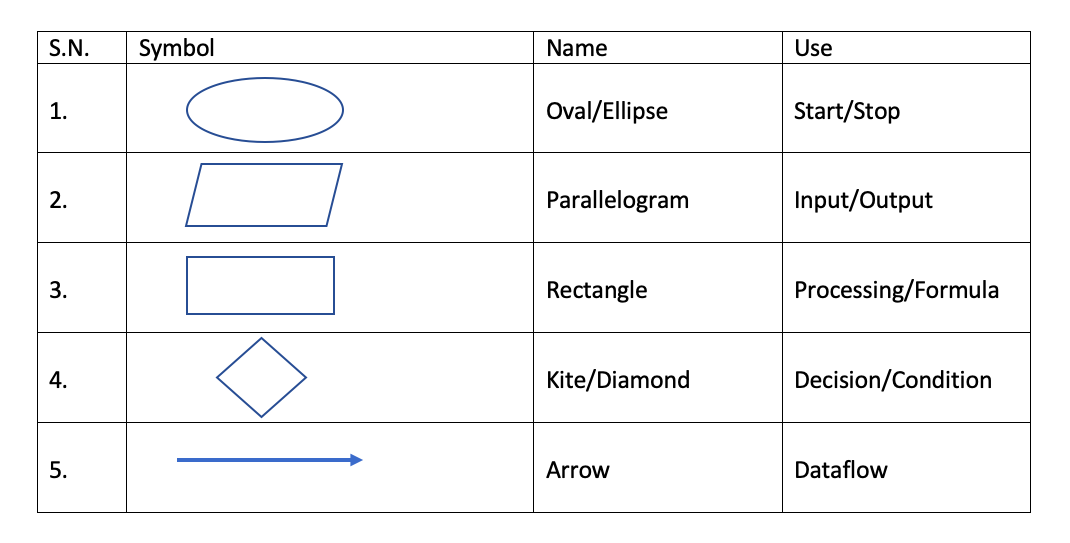
Example:
Draw a flowchart to input the principle amount, time and rate and find the simple interest.
Pseudo code:
It is similar to English structure. It is a language which almost similar to computer language. It isn't a program but it is a form or syntax or general format of a program. We can easily understand it.
Pseudo code for calculating volume of cuboids
Input Length, Breadth and Height
Calculate Volume= Length * Breadth * Height
Output Volume
Decision Tree:
It is a tree like structure which explains the alternative possible condition of the particular problem.
Decision Table:
Decision table is where number of alternative possible condition of a program is to form a program.
Programming Statement:
An instruction or expression (also called code) written in high level language to do a specific task in a program is called programming statement. A programming statement may consist of keyword, constant, variables, operators, control statement, data type, library function, user-defined function etc. Three types of statement are used:
Simple Statement:
A simplest executable entity is called statement. A simple statement is a basic part of program and it is a single line expression which is used to carry out assignment, calculation or to test logical decision.
Examples:
- L=10 assign integer value 10 to L variable.
- LxB Multiplies the value of L and B.
- P>=80 Logical statement to check p is greater than or equal to 80 or not?
Compound Statement:
A single instruction composed of two or more individual instructions is called compound statement.
Example of compound statement to calculate circumference of a circle. C=2*pi*r;
Control Statement / Program Control Structure:
A statement that affects the flow of execution through a program is called control statement. Control Statement is also called control structures in high level languages. There are three types of control statements:
- Sequence
- Selection/Selection/Branching
- Iteration/Repetition/Looping
Sequence:
It is the set of program instructions which follow one another and are to be executed unconditionally (not dependent on any program conditions). Instructions are put in a predefined sequence (just like a queue in a cinema hall) and the next instruction is executed by CPU only after the execution of the previous instruction (C never comes before B).
Selection:
It is the set of instructions which are to be executed conditionally i.e. they are executed based on a condition that can be either true or false. Commonly used logic for selection are if condition, if else condition, if else if condition, nested if else condition and switch case condition.
1. If condition:
If condition is used in case the given problem has only one condition and only one action. Considering either true or false part, if the given condition is true then the statement will be executed. Otherwise, the control exits from the condition.

Example:
Check the number is positive.
Algorithm
- Start
- Input N
- If (N>0), output is positive
- End

2. If else condition:
This condition is used if the problem has one condition but two alternative actions. Here, if the condition is true, statement 1 will be executed; otherwise, statement 2 will be executed.

Example:
Find the greatest between 2 numbers.
Algorithm
- Start
- Input X, Y
- If (X>Y) output X is greatest else output Y is greatest
- End

3. If else if condition:
Also known as ladder type if else, we can use this condition if the given problem has more than one interrelated conditions with their respective actions. Here, on a check, if condition 1 is true then, statement 1 is executed. Otherwise, condition 2 is checked and if it is true, statement 2 is executed and so on for next conditions. If all conditions are false, then the last statement will be executed.

Example:
Find the greatest among 3 numbers.
Algorithm
- Start
- Input P, Q, R
- If (P>Q && P>R) output P is greatest else if (Q>R) output Q is greatest else output R is greatest
- End

4. Nested if else condition:
Nested if else condition is an entire if-else statement which is written within the body of if part or else part of another if else statement. This condition is used when a condition is to be checked that is inside another condition at a time in the same program, to make a decision.

Example:
Find the greatest 2 positive numbers.
Algorithm
- Start
- Input X, Y
- If (X>0 && Y>0) { if (X>Y) output X is greatest else output Y is greatest } output X or Y may be negative
- End

5. Switch case condition:
If the given problem has one condition and respective more than two actions, then in this type of case scenario, we can use Switch case condition. It is the multiple branching statements which checks the value of the variable to the case value and then, the statements that are associated with it will be executed. If any expression does not match any of the case value, then the default statement will be executed.

Example:
Write an algorithm and draw a flowchart which takes the integer value 1 to 7 and prints respective day.
Algorithm
- Start
- Switch (day) { case 1: output Sunday break case 2: output Monday break ... case 7: output Saturday break default: output out of range }
- End

Iteration:
These are the computer instructions which are to be performed repeatedly and conditionally i.e. loop statements are driven by the loop condition. Commonly used logic for iteration are while loop, do while loop and for a loop.
1. While loop:
In this loop, first, the condition is checked by the computer and if the condition turns out to be true, then the statement inside the loop is executed. This process is repeated and the value of increment and decrement operator is always changing. When the condition is false, the loop stops.
Algorithm Syntax
Initialization
while (condition)
{
statements
..................
..................
increment/decrement
}

Example:
Write an algorithm and draw a flowchart to print 1 to 10.
Algorithm
- Start
- I=1
- While (I<=10) { output I I++ }
- Stop

2. Do while loop:
In this loop, first, the computer checks the initial value; second executes the statements inside the loop and finally, checks the condition. The process is repeated for next pass, if the condition is true. Otherwise, the loop stops. If the condition is initially false, it will execute for at least one time.
Algorithm Syntax
Initialization
while (condition)
do{
statements
..................
..................
increment/decrement
} while (condition)

Example:
Write an algorithm and draw a flowchart to print 100 to 1.
Algorithm
- Start
- A=100
- Do { output A A++ } while (A>1)
- Stop

3. For loop:
It is the most commonly used loop. It consists of 3 expressions; initialization, condition and counter, which are defined within a statement.
Algorithm Syntax
for (initialization; condition; counter)
{
statements
..................
..................
}
Where, initialization is starting point,
the condition is stopping point and increment/ decrement is a counter.

Example:
Write an algorithm and draw a flowchart to print a multiplication table of 7.
Algorithm
- Start
- For (i=1; i<10; i++) { m = i*7 output m }
- Stop

Data Representation Codes (Internal Storage Encoding of Characters)
INTRODUCTION TO CODES
A computer can only understand binary numbers which are in the form of two electronic states i.e. high voltage and low voltage. Such notations are further derived into standard codes and such codes can represent the data for users' convenience. Some of the popular codes are:
1. Absolute Binary (pure binary):
In an absolute binary method, 0 is placed before the binary number to represent positive number and 1 is placed before the binary number to represent a negative number. The most significant bit in binary number denotes the sign bit and the rest bits represent the actual number. The binary number is expressed in 8,16,32,64, etc. bit format.
2. BCD (Binary Coded Decimal):
It is a simple system for converting decimal numbers into a binary form where each decimal number is converted separately into binary and placed spaces in between numbers. In BCD, each decimal digit occupies 4 bit. For example, the decimal number 24 can be represented in BCD as (0010 0100)₂.
3. ASCII (American Standard Code for Information Interchange):
ASCII is a standard coding system that assigns numeric values to the letter, numbers, punctuation marks and control characters to achieve compatibility with different hardware and peripherals. ASCII was developed in 1968 and was divided into 2 sets: Standard ASCII (7 bits code, 128 characters) and Extended ASCII (8 bits code, 256 characters). Most systems use 8 bit extended ASCII to represent foreign language characters and other graphical symbols.
In ASCII, each character is represented by a unique integer value from 0 to 255. The value 0 to 31 is used for non-printing control characters and the range from 32 to 127 is used to represent the letters of the alphabet and common punctuation symbols. For example: ASCII code for capital letter A is 65, for * is 42, etc. Since, ASCII code uses 8 bits, each character represented in ASCII code occupies 1-byte storage space in a computer.
EBCDIC (Extended Binary Coded Decimal Interchange Code):
It is an 8-bit code system which is commonly used on large IBM mainframe computers, most IBM minicomputers and computers from many other manufacturers. It allows 256 characters to be represented in computers.
In this code, placement of the letters of the alphabet is discontinuous and there is no direct character to character match when converting from EBCDIC to ASCII and vice versa.
Unicode:
It is a 16-bit character code defined by the Unicode Consortium and International Standard Organization (ISO) that supports up to 65,536 characters. It allows all the characters and symbols in any language in the world to be represented by a single code. For example, the Chinese language has almost 10,000 characters which can be represented by Unicode only. If Unicode is universally adopted, then it will make multilingual software much easier to write and maintain.
Since, Unicode uses 16 bits, each character represented in Unicode occupies 2 bytes storage space in the computer. This coding system has been developed to overcome the drawback of ASCII code that supports only 256 different characters, which is sufficient only for English language but not for all the languages like Chinese, Japanese, etc. which has more than 256 characters. The Unicode Worldwide Character Standard provides up to 4 bytes (32 bits) now.
5.2 C Programming Languages
What is C? Explain its development process.
C is a high level language because no need for any architecture knowledge in normal English form.
C is a compiler because it can translate the whole program at a time so we can call compiler. C is structured programming language. It is called also procedural oriented programming language, function oriented language, module programming language. It is simple, reliable and easy to use.
Development Process (History of C):
C was originally developed in the 1970 by Denis Ritchie at bell telephone Laboratory in corporation (now a part of AT and T). It is an outgrowth of two earlier languages called BCPL (Beginners computer programming language) which was also developed language at Bell Laboratory until 1978 from a Brian Kernighan and Ritchie published a definitive description of Language.
1970-1972 = Dennis Ritchie at the Bell Laboratory USA.
1989 = Government of USA clear the C language is the computer language.
C is the case sensitive language (Capital and small letter is different in C).
ALGOL (ALGOrithmic Language, 1960)
CPL (Combined Programming Language, 1963)
BCPL (Basic Combined Programming Language, 1967)
B Language (1970)
C Language (1972)
What are the features of C? What are its advantages and disadvantages?
C is a computer language and a programming tool which has grown popular because programmers preferred it. It is a tricky language but a masterful one.
The C programming languages has the following features:
- It has small size.
- It has extensive use of function call.
- It is a strong structural language having powerful data definition methods.
- It has low level (Bit Wise) programming available.
- It can handle low level activities.
- Pointer makes it very strong for memory manipulations.
- It has level constructors.
- It can produce efficient programs.
- It can be complied on variety of computers.
Advantage of C language
- It is machine independent programming language.
- It is easy to learn and implement C language.
- It can be implemented from mobile device to mainframe computers.
- It is the mother of all modern programming language.
Disadvantage of C Language
- There is no runtime checking.
- It has poor error detection systems.
- On large programs, it is hard to fix errors.
- It does not support modern programming methodologies oriented programming language.
What is preprocessor? Explain with its types.
The compiler of C has a preprocessor built into it. Lines that begin with # are called pre-processor directives. Each C program must start with proper header files (i.e.<stdio.h>) starting with '#', sign, 'include' and a header file name enclosed within triangle brackets.
- The preprocessor handles directives for source file inclusion (#include), macro definitions (#define), conditional inclusion (#if, #ifdef, #elif, #endif) and miscellaneous directive (#pragama, #undef, #error).
- The languages of preprocessor commands are considered as a language within C language. The preprocess offers several feature called preprocessor directives.
What is header file? List the header files with some functions, where are they used?
A file that is defined to be included at the beginning of a program in C language that contains the definitions of data types and declarations of variables used by the functions in the program is called header file.
- Header files commonly contain forward declarations of classes, subroutines, variables, and other identifiers.
- The header file in c is called standard library functions.
- The entire header file has the extension .h
- A header file is used to define constants, variables, macros and functions that may be common to several applications.
- The updating and reading data of any function can be performed by using the header files.
Some of the frequent used header files are explain below:
| S.N. | Header File | Description | Main Functions |
|---|---|---|---|
| 1 | stdio.h | Standard input and output | fopen(), fclose(), rename(), gets(), puts(), getchar(), scanf(), printf() etc. |
| 2 | conio.h | Old MS-DOS compiler header file, used for console input & output. | getch(), getche() |
| 3 | math.h | Mathematical calculation in C program. | sin(x), cos(x), log(x), pow(x,2), sqrt(x), cbrt(x), ceil(x), floor(x) etc. |
| 4 | complex.h | Complex arithmetic | cpow(x,p), csqrt(x), ctan(x), ctanh(x), cabs(x) |
| 5 | string.h | String / Words manipulation function | strlen(y), strcpy(z,y), strcmp(z,y), strcat(z,y), strupr(y), strlwr(y) etc. |
| 6 | ctype.h | Character manipulation type header file | toupper(y), tolower(y), isupr(y), isspace(), isalnu(y), toascii(y) etc. |
| 7 | stdlib.h | General purpose standard library. | rand(), malloc(), calloc(), abort(), exit() abs(), free() etc. |
Fundamentals of C
1) What are the character set used in C?
A group of alphabetic, numeric and other characters that have some relationship with C programming language and recognized by compiler is called Character set. A character set can also contain additional characters with other code values.
The keywords, identifiers and other variables are constructed by using character set. The character set consists of following elements.
| 1) Alphabets: | = Uppercase (i.e. A,B,.........Y,Z) and Lowercase (i.e. a,b,.........y,z) |
|---|---|
| 2) Digits: | = 0,1,2,....................................8,9 |
| 3) Special Symbols | = + - * / = ( ), { } < > ' " ! # % & _ \ ; : ? |
| 4) White space characters: | = blank, new line, tab etc. |
Variables and Constants
A variable is a named memory location that can store a value which can be changed during program execution. A constant is a value that cannot be changed during program execution.
Rules for naming variables in C
- Variable name must begin with a letter or underscore (_).
- It can contain letters, digits and underscore.
- It cannot contain blank spaces or special characters.
- Variable names are case sensitive.
- Keywords cannot be used as variable names.
- Maximum length of variable name is 31 characters (in older compilers) or 63 characters (in modern compilers).
Declaration of variables
data_type variable_name;
data_type variable1, variable2, ...;
Initialization of variables
data_type variable_name = value;
Data Types in C
C supports the following basic data types:
| Data Type | Size (bytes) | Range | Format Specifier |
|---|---|---|---|
| char | 1 | -128 to 127 | %c |
| unsigned char | 1 | 0 to 255 | %c |
| int | 2 or 4 | -32768 to 32767 or -2147483648 to 2147483647 | %d or %i |
| unsigned int | 2 or 4 | 0 to 65535 or 0 to 4294967295 | %u |
| short int | 2 | -32768 to 32767 | %hd |
| long int | 4 | -2147483648 to 2147483647 | %ld |
| float | 4 | 3.4E-38 to 3.4E+38 | %f |
| double | 8 | 1.7E-308 to 1.7E+308 | %lf |
| long double | 10 | 3.4E-4932 to 1.1E+4932 | %Lf |
Modifiers
- signed, unsigned, short, long
Operators in C
1. Arithmetic Operators
- + (Addition)
- - (Subtraction)
- * (Multiplication)
- / (Division)
- % (Modulus)
2. Relational Operators
- == (Equal to)
- != (Not equal to)
- > (Greater than)
- < (Less than)
- >= (Greater than or equal to)
- <= (Less than or equal to)
3. Logical Operators
- && (Logical AND)
- || (Logical OR)
- ! (Logical NOT)
4. Assignment Operators
- = (Simple assignment)
- +=, -=, *=, /=, %= (Compound assignment)
5. Increment and Decrement Operators
- ++ (Increment)
- -- (Decrement)
6. Bitwise Operators
- & (Bitwise AND)
- | (Bitwise OR)
- ^ (Bitwise XOR)
- ~ (Bitwise NOT)
- << (Left shift)
- >> (Right shift)
7. Conditional (Ternary) Operator
condition ? expression1 : expression2
8. Special Operators
- sizeof()
- , (Comma operator)
- . and -> (Member operators)
- [] (Array subscript)
- () (Function call)
Control Structures
1. Decision Making / Branching Statements
- if statement
- if-else statement
- else-if ladder / nested if
- switch statement
2. Looping / Iteration Statements
- while loop
- do-while loop
- for loop
- nested loops
3. Jumping / Unconditional Control Statements
- break
- continue
- goto
- return
Arrays
An array is a collection of similar data types stored in contiguous memory locations.
Declaration
data_type array_name[size];
Initialization
data_type array_name[size] = {value1, value2, ...};
Types of Arrays
- One-dimensional array
- Two-dimensional array (matrix)
- Multi-dimensional array
Strings
A string is a one-dimensional character array terminated by a null character ('\0').
Declaration
char string_name[size];
String Handling Functions (string.h)
- strlen()
- strcpy()
- strcat()
- strcmp()
- strrev()
- strupr()
- strlwr()
Functions
A function is a self-contained block of statements that performs a specific task.
Types of Functions
- Library functions
- User-defined functions
Function Declaration / Prototype
return_type function_name(parameters);
Function Definition
return_type function_name(parameters)
{
    // body
}
Function Call
function_name(arguments);
Categories of User-defined Functions
- No argument, no return value
- No argument, with return value
- With argument, no return value
- With argument, with return value
Recursion
A function calling itself is called recursion.
Storage Classes
- auto
- register
- static
- extern
Pointers
A pointer is a variable that stores the memory address of another variable.
Declaration
data_type *pointer_name;
Structures and Unions
Structure
struct structure_name
{
    data_type member1;
    data_type member2;
    ...
};
Union
union union_name
{
    data_type member1;
    data_type member2;
    ...
};
File Handling in C
- fopen()
- fclose()
- fgetc(), fputc()
- fgets(), fputs()
- fread(), fwrite()
- fprintf(), fscanf()
Dynamic Memory Allocation
- malloc()
- calloc()
- realloc()
- free()